A simple workflow for a house cleaning business: schedule, track, get paid and follow up
A cleaning business is mostly four things: getting booked, showing up, getting paid and being remembered. You can run all four from your phone with a few free tools. Here is a setup that works, and the small habits that make it work.
By Billy Allison, Founder, Photo Luego
Published · Last edited · 8 min read
1. Take bookings that tell you everything you need
An online scheduler such as Calendly lets customers pick a time without a phone call. The tool matters less than how you set it up.
- Set the time to what the job really takes. A standard clean, a deep clean and a move-out clean take different amounts of time. If your plan lets you make more than one booking type, make one for each service. The free Calendly plan allows only one, so use a single booking type and let the form question "What kind of clean is this?" tell you which it is. Either way, use the time it really takes, not the time you hope it takes.
- Leave room for travel. Add a buffer before and after each booking, so a clean that runs long does not make you late to the next house. Set a minimum notice too, such as 24 hours, so nobody books you for an hour from now.
- Cap the day. Limit how many bookings you take per day, so the schedule matches what you and your team can actually do.
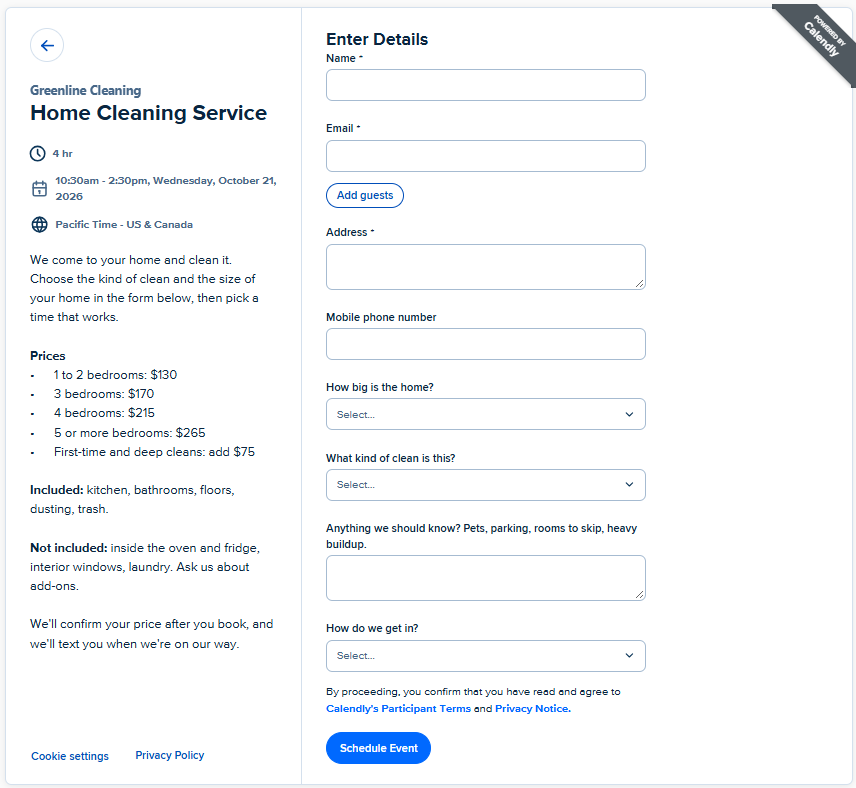
Then use the booking form to collect what you would otherwise chase by text. Add these questions to your booking form, and make the first five required:
- Service address. Ask for the unit or apartment number too.
- Mobile phone number. This is how you text "on my way".
- How do we get in? A dropdown: "Someone will be home", "Hidden key", "Lockbox", "Building front desk or doorman", "Other (explain below)".
- What kind of clean is this? A dropdown: "Regular clean (the home is kept up)", "First-time or deep clean", "Move-out clean".
- How big is the home? A dropdown with ranges that match how you price, such as "1 to 2 bedrooms", "3 bedrooms", "4 bedrooms", "5 or more bedrooms".
- Anything we should know? Pets, parking, rooms to skip, heavy buildup. Optional.
This is what your customer sees when they book: your description on the left, and the questions on the right.
Not every clean takes the same time
Cleaners say the hardest part of scheduling is that one clean takes two hours and the next takes eight, and no booking tool gets that exactly right. Do not chase a perfect schedule. Get close, and leave room for the misses:
- Book a first visit for longer than a regular one, and tell the customer you will confirm the price after you see the home.
- After a long job, leave extra open time before the next booking, so one slow house does not push the whole day back.
- Where the form allows it, ask the customer to send a couple of photos of the worst rooms.
- Keep a note of how long each home really took, so the next booking for that customer is accurate.
Check what your Calendly plan includes before you rely on reminders or a team calendar. The details differ by plan.
If you use Photo Luego Pro, every booking can become a job automatically, with the customer's name, phone and address filled in, and the answers from your form kept private to you and your team. See Connect Calendly.
2. Keep recurring customers on a schedule you can repeat
Once you have regulars, the problem stops being single bookings and becomes a puzzle. Weekly, every-other-week and monthly customers land on the same day, and no two weeks look alike. Owners with a team and a lot of jobs describe spending hours a week rearranging the calendar. What worked for them was a few simple rules, not more software.
- Offer a few fixed rhythms: weekly, every two weeks and every four weeks. Odd ones, such as every three weeks or the third Friday of the month, break your blocks. If a customer asks for one, offer the nearest rhythm.
- Put the rhythm in the job name, such as "2W Smith" or "4W Garcia", so you can read the schedule at a glance. In Photo Luego the job name is free text, so you can do this there too.
- Give each day a purpose. For example, every-other-week customers on Monday and Wednesday, every-four-week customers on Thursday, and Friday kept open for first visits, reschedules and catching up.
- Batch by neighborhood, so you spend the day cleaning instead of driving.
- Keep the same cleaner with a regular customer. It builds trust and makes quality easy to follow up on. If you can, use someone else for one-time jobs.
- Offer a discount to customers who do not mind being moved. Everyone else gets a fixed slot.
- Do not let one contractor carry too much of your work. If they quit, you want the jobs easy to cover.
3. Make sure everyone sees the schedule
The most common reason a cleaner misses a job is that the schedule lived in one person's head. Fix it with one rule: if it is not on the shared calendar, it is not booked.
- Have your scheduler write every booking to one calendar, such as Google Calendar, and share that calendar with each person on your team.
- Put the address in the event's location field, so a tap opens the map.
- Have each person turn on notifications on their phone, with one reminder the evening before and one before they leave.
- Give each cleaner a color, so you can see who is where at a glance.
If you work with helpers, you can add them to Photo Luego Pro with a QR code, with no accounts to set up. Whatever they photograph lands in your jobs. See Add people to your team.
4. Get paid without chasing anyone
People pay the way they are used to, so offer a few ways: a card link, Venmo, Cash App, PayPal, Zelle, or a check. The easier it is, the faster it happens.
- Ask for payment up front when you can, especially for a first-time customer or a large job. Put your payment link in the booking confirmation.
- Keep your payment details handy. Save your Venmo or Cash App QR code on your phone, so a customer at the door can scan it.
- Use a business account. Venmo, Cash App and PayPal each have their own rules for business use and fees, so check them. A business profile also keeps your personal spending out of your records at tax time.
When you make a Photo Luego report, add your payment link once and every report ends with a pay button. On a computer screen, or a printed or PDF copy, it also shows a QR code. See Get paid with Venmo, Cash App or PayPal.
5. Show your work and get the next booking
Cleaning has a problem: the better you do, the less there is to see. A spotless kitchen looks like nothing happened, and a customer who never saw the grease on the oven forgets it was there. A short report at the end of the job fixes that.
- Take a few before and after photos of the same spots: the stove, the fridge, the bathrooms, the floors. It takes a couple of minutes. See the house cleaning photo checklist for what to shoot.
- Send the report the same day, with a thank-you, a link to leave a review, and your payment button. See Send a report to your customer.
- Ask for the review while the house still looks great. The report puts the review button right where the customer is looking.
- End with the next step. Most new customers are one-time ones, so the report is your chance to turn them into regulars: "Want us back every two weeks? Reply and I will hold your spot."
Then keep a simple list of your customers: name, phone or email, address, what they like and when you last cleaned. It is the cheapest marketing you have. A message every few weeks to a regular, a "spring clean" offer, or a note before the holidays brings back people who already trust you. Contact only people who have hired you, and never share their details.
Putting it together
- When someone books: the form gives you their phone, address and how to get in. The booking lands on the shared calendar.
- The day before: your team gets a reminder. Confirm with the customer if you can.
- At the house: take the before photos, clean, then take the after photos from the same spots.
- Before you leave: send the payment link, or show the QR code.
- That evening: send the report and the review link. Add the customer to your list.
None of this needs expensive software. It needs the same few habits on every job.
By Billy Allison, Founder, Photo Luego
Published · Last edited · 8 min read
General advice, not legal, tax or financial advice. Rules and fees for scheduling and payment services change, so check each one.